Tlab.pro 5.11.1 — knockout brackets for up to 1024 players
9/22/2026
Update 5.11.1 is mostly about size. A single elimination bracket now takes up to 1024 participants instead of 128, and what was comfortable with thirty names and painful with seven hundred has been reworked: how the bracket is shown, how you find a player in it and how the participant list is filled. The service has also started asking organisers how their tournament went, and a batch of bugs is gone.
Knockout brackets for up to 1024 participants
The participant limit for single elimination has gone from 128 to 1024. The other formats keep theirs: double elimination stays at 128, round robin at 64 and the Swiss system at 128. How a knockout bracket works and why its size is always a power of two is covered in the guide to single elimination.
A bracket that size cannot be drawn in one piece: its first round alone is 512 matches, some 60,000 pixels of scrolling. So from 128 participants up the bracket is shown in parts — segments, each of them a small bracket of its own, and a final block with the last rounds.
| Bracket size | Segments | Slots per segment | Final block |
|---|---|---|---|
| 128 | 8 | 16 | quarter-finals → final, 7 matches |
| 256 | 16 | 16 | round of 16 → final, 15 matches |
| 512 | 16 | 32 | round of 16 → final, 15 matches |
| 1024 | 16 | 64 | round of 16 → final, 15 matches |
Brackets of up to 64 participants are drawn whole, as before. 128-player brackets now open in parts too, but at that size, and only at that size, a switch above the bracket offers whole bracket next to by parts, and your browser remembers the choice.
Finding your way around a big bracket
Above the bracket sits a map of it: one strip per segment, in the order of the draw, joined to the final block the way the bracket itself joins them. A strip shows the positions it holds, such as 129–192, and who came out of it — or, while it is still being played, the names at its two ends.
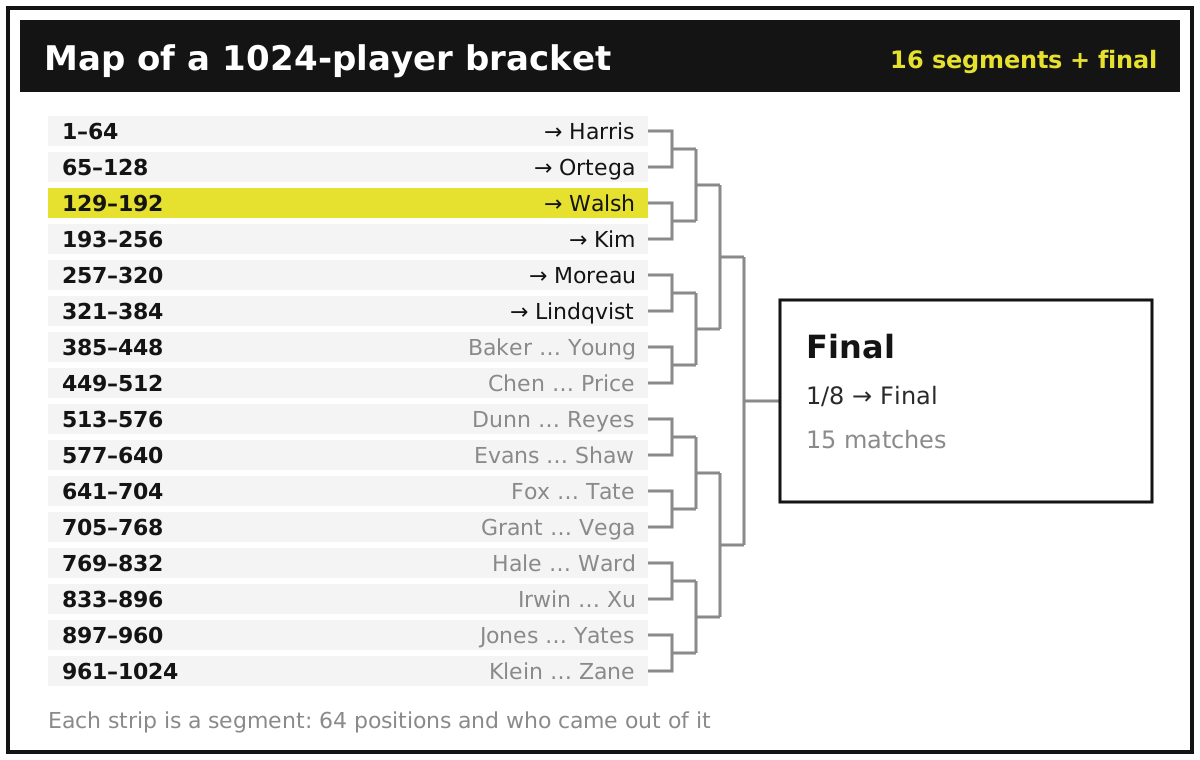
- Click a strip to open that segment; the ‹ › arrows next to its title step to the neighbours.
- Search participant looks through the whole draw and opens the segment where the chosen player starts — the browser's own find-in-page only sees the part that is drawn.
- Links point at a part. An open segment adds "?segment=5" to the address, so a group of players can be sent straight to their part of the draw.
- The final block opens first once anyone has reached it; until then the first segment does.
- Round captions stay pinned while you scroll a tall segment, and on a phone the map folds into a single row that opens into a list.
- Image export takes the open part, and the export window tells you which one before you save.
The bracket also got lighter. Saving a score used to redraw every tile in it; now only the tiles that actually changed are redrawn, so even a 128-player bracket responds several times faster.
A participant editor for long lists
The old participant editor was built for dozens of names. Paste 700 and the list rounds itself up to 1024 rows, leaving 324 empty slots, each of which used to take its own click to become a bye; moving the player in row 900 up to row 5 took hundreds of clicks on the arrows. Both are one action now.
- Fill remaining slots. A panel above the list counts the empty slots — Empty slots to fill: 324 — and its fill remaining slots button turns all of them into byes at once. They get the same label as a bye added with Add a cell with a blank participant, "-" by default.
- Type a position. The number in the # column is now a field: type 5 into row 900 and that participant moves to position 5, while everyone in between shifts down by one.
- A dash in a pasted list is a bye, not a player called "-".
- Pasted names fill the empty slots first, and only then does the list grow. A list that had already been rounded up used to refuse the paste altogether.
- Long lists stay smooth, because only the rows on screen are drawn.
- Self-registration tournaments can announce places and a reserve up to the limit of their format instead of stopping at 128.
How many byes a field needs and who should get them is worked out in a bracket for any number of players; the creation wizard is described step by step in the help section.
Tell us how the tournament went
When a tournament is over — the final and any third-place match are played, or every round-robin match has a result — its organiser now sees a small Tournament finished window with one question: how did it go, what was missing, what was inconvenient?
Please answer it, even with one line. The answers come straight to us, and they decide what we fix first and what we build next — a comment written right after the final, while the details are fresh, beats any guess of ours about what organisers need.
The window tries to stay out of the way. It appears a couple of seconds after the last result, or the next time you open the finished tournament, never on top of another window, and only to the owner of a tournament with at least four real participants, within a week of its last result. Group stages feeding a playoff and Swiss tournaments, whose rounds are added by hand, do not ask. Not now puts it off until your next visit, Don't ask again closes it for this tournament for good.
Anything that does not fit that moment — a bug, an idea, a question — can be sent at any time through the contact links in the help section.
Bug fixes
- a random draw spreads the byes evenly, and a seeded one gives them to the seeded participants;
- unconfirmed scores entered by players count in the standings;
- embedded tournaments show up on other websites again;
- a walkover or a retirement without a score shows as completed in the match tooltip;
- round labels in the Swiss new-round window and the "round is in progress" note are fixed;
- creating a new statistics item in your profile no longer fails;
- the participant-limit message names the real limit of the format;
- the Polish interface got proper button labels;
- players no longer see a button for deleting the result of their own match;
- a tournament whose links were all removed can be linked again.
Try it out
That is 5.11.1: a knockout bracket for up to 1024 participants that opens in parts and lets you find any player, a participant list where hundreds of empty slots are filled with one button, a short question at the end of a tournament, and a batch of fixes. The previous release was update 5.10.1, with penalties, retirements and the German interface.
Planning a big event? Create a tournament or start from the single elimination bracket generator — and if something is missing or unclear, the contact links are in the help section.