How to run a school tournament
7/20/2026
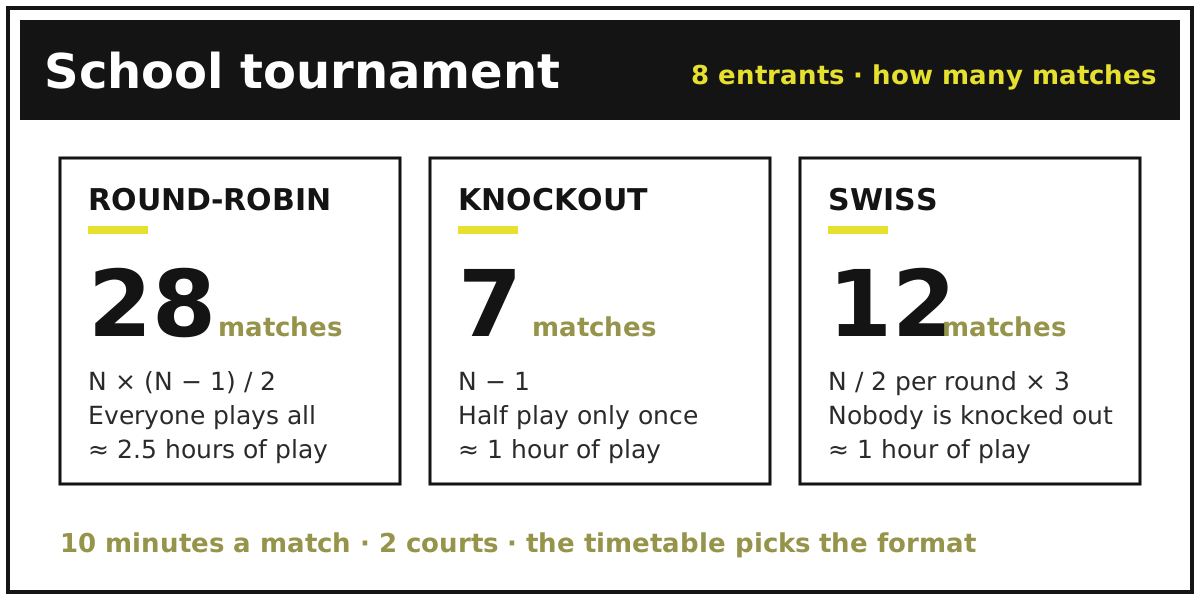
A school tournament is limited not by the rules of the game but by the timetable. The gym is free for two hours, a lesson lasts forty-five minutes, and next week the term changes — and the format grows out of that, not out of sporting considerations. Let's work out how to size a tournament in advance so it doesn't stall halfway, and what to do so the results don't vanish a week later.
Count the matches first
The format is decided by a single number: how many matches you can physically fit in. The arithmetic is simple:
| Format | Matches | 8 entrants | 16 entrants |
|---|---|---|---|
| Round-robin (single) | N × (N − 1) / 2 | 28 | 120 |
| Knockout | N − 1 | 7 | 15 |
| Swiss | N / 2 per round, rounds ≈ log₂(N) | 12 (3 rounds) | 32 (4 rounds) |
The difference is enormous. Eight classes in a round-robin means 28 matches: at ten minutes a game on two courts that is about two and a half hours of playing time — a full sports day. The same eight classes in a knockout is seven matches, a little over an hour, which fits into a double lesson. Sixteen entrants in a round-robin is 120 matches: that is no longer a tournament but a month-long league.
Multiply the number of matches by the length of one game, add five minutes between games for teams to swap over, and divide by the number of courts. Compare the result with the time you actually have — and only then pick the format.
Which format to choose
Round-robin — when there are few entrants (up to six or eight) and you want everyone to play everyone. It is the fairest option: one bad game doesn't throw a team out, and the final table reflects the whole day rather than a single fluke. For inter-class competitions within a year group it is usually the best choice. Details are in the article on round-robin scheduling. A quick overview of the tool itself is on the round robin schedule generator page.
Knockout — when there are many entrants and little time. The match count is minimal, a winner emerges quickly and the final has a real edge to it. The downside is obvious: half the entrants play exactly once and go home. In a school that matters — children came to play, not to be eliminated — so a knockout works best as a second stage, after groups. How the bracket is built and where byes come from is covered in the article on the single elimination bracket. A quick overview of the tool itself is on the single elimination bracket generator page.
Swiss — the compromise: nobody is eliminated, yet the match count stays low. Each round pairs entrants by their current standing, so roughly equal opponents meet. It suits chess, draughts and esports events where there are many entrants and few boards or machines. More in the article on the Swiss system. A quick overview of the tool itself is on the Swiss-system tournament generator page.
Groups plus knockout — if the day is long. Split the entrants into two or three groups, run mini round-robins inside them and send the best into a bracket. In Tlab.pro this is done by linking tournaments together — see the help topic on linking tournaments.
If you are unsure where to start, there is a separate breakdown of how to choose a tournament format.
Classes as teams
In a school tournament an entrant is usually not a person but a class: "7A", "9B". Set them up as teams and fill in the line-ups — then you can track not only match scores but individual player statistics inside the team. That noticeably raises interest: a child sees their own numbers, not just their class in the table.
Keep the entrant name short and unambiguous — "7A" rather than "The 7A class team": long names wrap in the bracket and the table and break the layout. There is a separate description field for anything that needs explaining.
Who enters the results
Running the whole tournament from one phone is awkward, especially with several courts. There are two ways to take that work off yourself.
Editors. Invite a colleague or a senior student acting as referee by email — they get access to entering scores but cannot delete the tournament. Rights are granted separately: matches only, or the tournament as a whole. See the help topic on editors.
The entrants themselves. If the tournament runs with self-registration, captains can submit the result of their own game and the opponent confirms it — the organiser only rules on disputes. That takes almost all of the load off the teacher. See the topics on registration and players entering results.
Scores are entered on the "Matches" tab, along with the date, the court and, if needed, player statistics (how it is done).
A link for parents and the school website
What separates a tournament on a service from a tournament on a sheet of paper is that the result stays available after everyone has gone home.
- A link. Send the tournament address to the parents' chat — the table updates as games are played, with nothing to refresh.
- A screen in the hall. Open the tournament page on a projector or TV: the bracket updates itself as results come in.
- The school website. The tournament embeds into a page via an iframe, so the table lives on the school site itself.
- An image. The bracket or table can be exported as a picture and sent where links are out of place.
That scenario is exactly what TLab Edu was made for: an educational tournament stays fully active for a year instead of three months, its page carries no ads, and it doesn't use up your tournament limit. The status is granted free on request — there should be no ad blocks next to children's names, and a link sent to parents should never be awkward to open.
A short checklist
- Work out how many matches you can fit in — and only then choose the format.
- Set the classes up as teams, fill in the line-ups, keep the names short.
- Hand out editor rights or switch on self-registration.
- Check the bracket before the start: rebuilding it mid-event is harder than it looks.
- Send the link to parents and apply for TLab Edu status so the page stays.
Frequently asked questions
How long does a school tournament for 8 classes take?
It depends entirely on the format. A round-robin is 28 matches — about 2.5 hours of actual play on two courts, which is essentially a full sports day. A knockout is 7 matches, about an hour. A Swiss is 12 matches across three rounds, also around an hour. Use the formulas in the table above and multiply by the length of one game.
What tournament fits into a single lesson?
Forty-five minutes leaves about thirty of actual play, so a knockout for four entrants (three matches) fits comfortably, or one for eight if games run five minutes on two courts. A round-robin for eight will not fit — better to spread it over several weeks, playing one round per lesson.
How do I make sure everyone plays instead of going out after one match?
Use a round-robin, where everyone plays the same number of games, or a Swiss, where nobody is eliminated at all. If there isn't time for either, run a group stage with a short knockout: then every entrant is guaranteed two or three games rather than going home after a single defeat.
How do I show the results to parents and on the school website?
Send the tournament link — the table updates itself as games are played. The page can go on a screen in the hall, be embedded into the school site via an iframe, or be exported as an image. To keep that link working a year later, with no ads next to children's names, apply for the free TLab Edu status.
Once the plan is ready, create the tournament; a step-by-step description of the wizard is in the help section.