Tournament page without a website: the Overview tab
10/25/2026
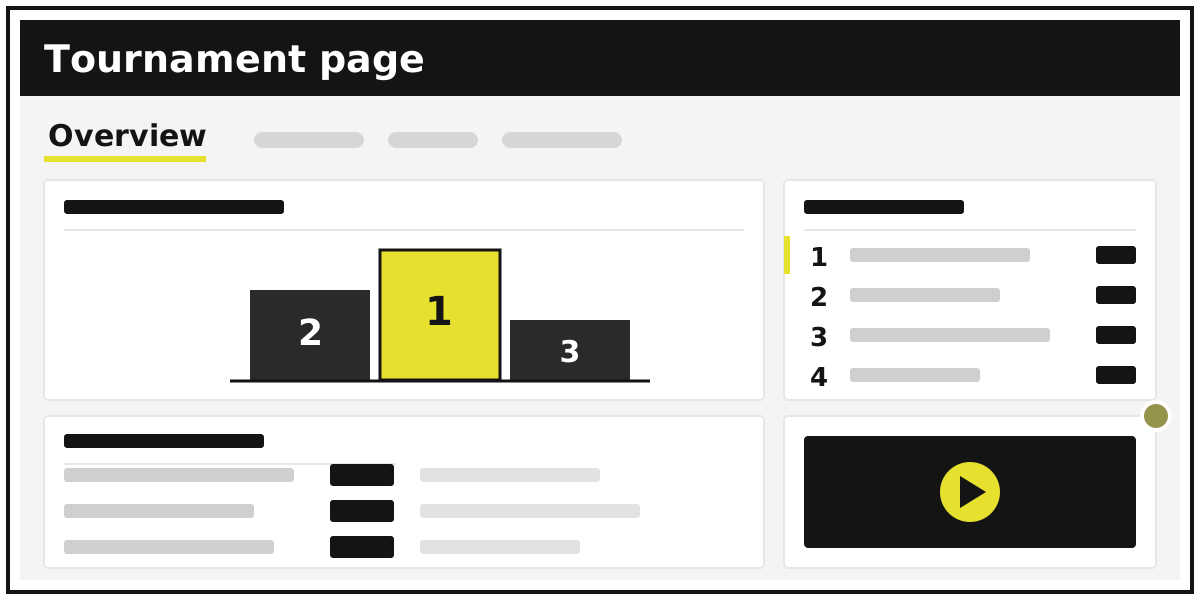
A week before the tournament the organiser's phone turns into a help desk. Where is it, how much is the fee, what time is our first game, who won yesterday? Each answer is one more message in the group chat, and whoever joins next scrolls past all of them. The Overview tab in Tlab.pro gathers those answers on one page that follows the tournament: sign-up before the start, scores while it runs, the podium after the final. Here is how to switch it on, what to put on it at each stage, and what is free.
One link instead of ten chat messages
Overview is a tab of the tournament built from widgets — small blocks that each answer one question: where, how much, who plays next. The page has a main column and a side column. On a phone they alternate — main 1, side 1, main 2 and so on — so the most important card stays on top on any screen.
When Overview is on, it is the first tab and the tournament opens on it. Whoever taps your link sees the venue and the next matches first; the bracket or table is one tab away. Widgets that read the tournament — registration, matches, standings — update themselves as results come in. The ones you fill in, such as the fee or the venue, you write once.
How to switch Overview on, and what appears straight away
A tournament with registration. While registration is open, Overview is always shown: the sign-up button is on it. A tournament created with registration starts with a set: Registration and About the tournament (its text copied from the registration description) in the main column, Participants in the side one. When the tournament starts, Overview switches off, and you switch it on again for the playing stage.
Any other tournament. In Tournament editing, tick Show the Overview tab. While Overview is hidden, you still see it in the tab menu, marked hidden, with a Show to visitors button.
If the page is empty when you switch Overview on, Tlab.pro lays out a set for the current stage:
| Stage | Main column | Side column |
|---|---|---|
| In progress, any format | Upcoming matches, Latest results | Standings / bracket |
| Finished, single or double elimination | Winners | Latest results |
| Finished, round-robin | Standings / bracket | Latest results |
If you have already added widgets, no set is added — the page is yours. A tournament is in progress as soon as its bracket or schedule exists, even with nothing played. A Swiss tournament never counts as finished.
The rest is done with Customize page, right on the page: add a widget from the catalogue, pick its column, move it, hide it. Each widget has a When to show setting — Registration, In progress, Finished — so the fee can vanish on match day and the prizes return after the final. Visitors see the changes after Save. A page holds up to 30 widgets. Step by step: the help topic on the Overview tab.
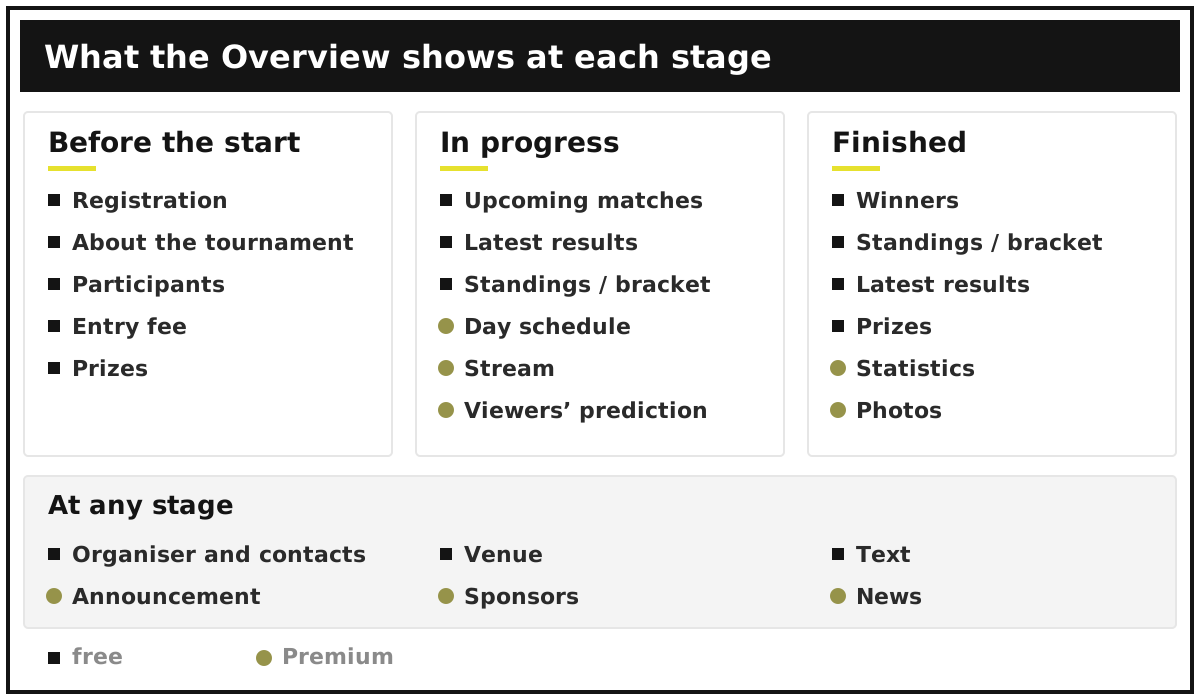
Before the start: sign up, venue, fee and prizes
Before the first match people ask four things: can I still join, where, how much, and what is there to win. Free widgets cover it all.
- Registration — how to sign up, the form questions, places and the reserve; those signed up see their own entry. Built from the registration settings, nothing to fill in. Registration stage only.
- Participants — the latest entries and a search, so a player checks they are on the list without asking you. Registration stage only.
- About the tournament — your own words; the format rules are added automatically.
- Entry fee — the amount, what it includes, how and when to pay.
- Venue — the address and a map link.
- Prizes — the prize fund and awards by place.
- Organiser and contacts — logo, name, Telegram, WhatsApp, Viber, phone, social networks. You type it all in; nothing comes from your account.
- Text — a free block for the rules or regulations.
Visitors never see an empty widget, so a half-filled page shows no blank boxes. For a five-a-side cup that usually means Venue with a pitch map and Entry fee per team; the format is covered in running a football tournament. At a school the same page replaces the note to parents — see how to run a school tournament.
During the tournament: who plays next, the score, the table
Three free widgets carry match day:
- Upcoming matches — the matches that can be played next, with both opponents known. In progress only.
- Latest results — the played matches, the furthest into the tournament first.
- Standings / bracket — the top of the table, or who is still in the bracket, the current round and its next matches.
All three are visible even before the first result — they simply say there is nothing yet, so the page looks alive rather than broken. In Latest results a viewer can press Auto, and the page refreshes itself every 2 minutes while open — handy on a screen in the hall. It is not saved; a reload turns it off.
Premium adds widgets for the day itself:
- Day schedule — matches with a date by day and hour, plus your programme: opening, breaks, award ceremony, up to 20 items per tournament. It has the Auto button too.
- Stream — up to 3 broadcast links; a YouTube stream plays right on the page.
- Viewers' prediction — you pick up to 4 matches; signed-in visitors guess the winner, one vote per match, and see the percentages after voting. A result closes the vote.
- Announcement — one notice in the tournament colour: "Parking is closed", "The final is on court 1".
After the final: winners, statistics, photos
Once the last score is in, the page becomes the record of the event — the link you send to players, parents or a sponsor.
Winners is free: the podium, the deciding matches with their score and the champion's path, built from the bracket. It works for single and double elimination and appears when the tournament is finished; in a round-robin, Standings / bracket shows the final table instead.
With Premium:
- Statistics — leaders by one statistics item: top scorers, the most aces, the fewest cards, 3–5 rows; one widget per item. It reads the items you set up on the Statistics tab — see automated statistics.
- Photos — a gallery of up to 20 photos with a cover and a viewer; uploaded one at a time, right in the widget.
- News — dated entries of up to 500 characters and/or one picture, up to 25 in all. They go live at once, without saving the page, so they suit any stage: a postponement, the day's results.
- Sponsors — up to 12 partner logos with links.
What is free and what needs Premium
Twelve widgets are free: About the tournament, Registration, Participants, Upcoming matches, Latest results, Standings / bracket, Winners, Organiser and contacts, Entry fee, Venue, Prizes, Text. Eight are Premium: Announcement, Sponsors, Day schedule, Stream, Viewers' prediction, Statistics, News, Photos.
Without Premium visitors see up to 4 widgets — main column first, then the side one; empty and hidden widgets do not count. Any Premium widget can still be added with Try it and set up: it stays on the page marked Trial · hidden from visitors, so you see how it looks before deciding.
Premium belongs to the tournament: it comes from a tournament code (a one-off code for one tournament) or from the subscription of the tournament's author. An editor with the right to edit the tournament gets exactly what the author has; the editor's own subscription does not count. Plans and prices are in the support section, the full catalogue in the help topic on Overview widgets, and the rest of the release in update 5.13.1.
Frequently asked questions
Do visitors need an account to see the Overview?
No, the page opens for anyone with the link, like the bracket. An account is needed only to sign up through registration or to vote in Viewers' prediction.
Why did the Overview disappear when the tournament started?
It switches off at the start because sign-up is over. Switch it on again: if the page holds only registration widgets, the in-progress set is added; if you added your own, the page stays as it was.
How many widgets can one page hold?
Up to 30. Without Premium visitors see the first 4; with Premium there is no limit.
Create a tournament with registration — the Overview appears by itself, with the sign-up already on it.